Create a case
A consultation (a case) holds everything about a visit: the journal text, diagnoses, appointments, invoices, attachments and prescriptions. It always belongs to a patient.
Interactive guide
Start the guide
Try it step by step in a copy of VetJay. Nothing you do there affects your clinic.
Create a consultation
There are several ways in:
- From an appointment: most cases are created when you book a patient visit. See Book an appointment.
- From Case Archive: click Create New Case, search for the patient and choose it.
- From Home: click + Case and choose the patient.
The consultation opens right away.
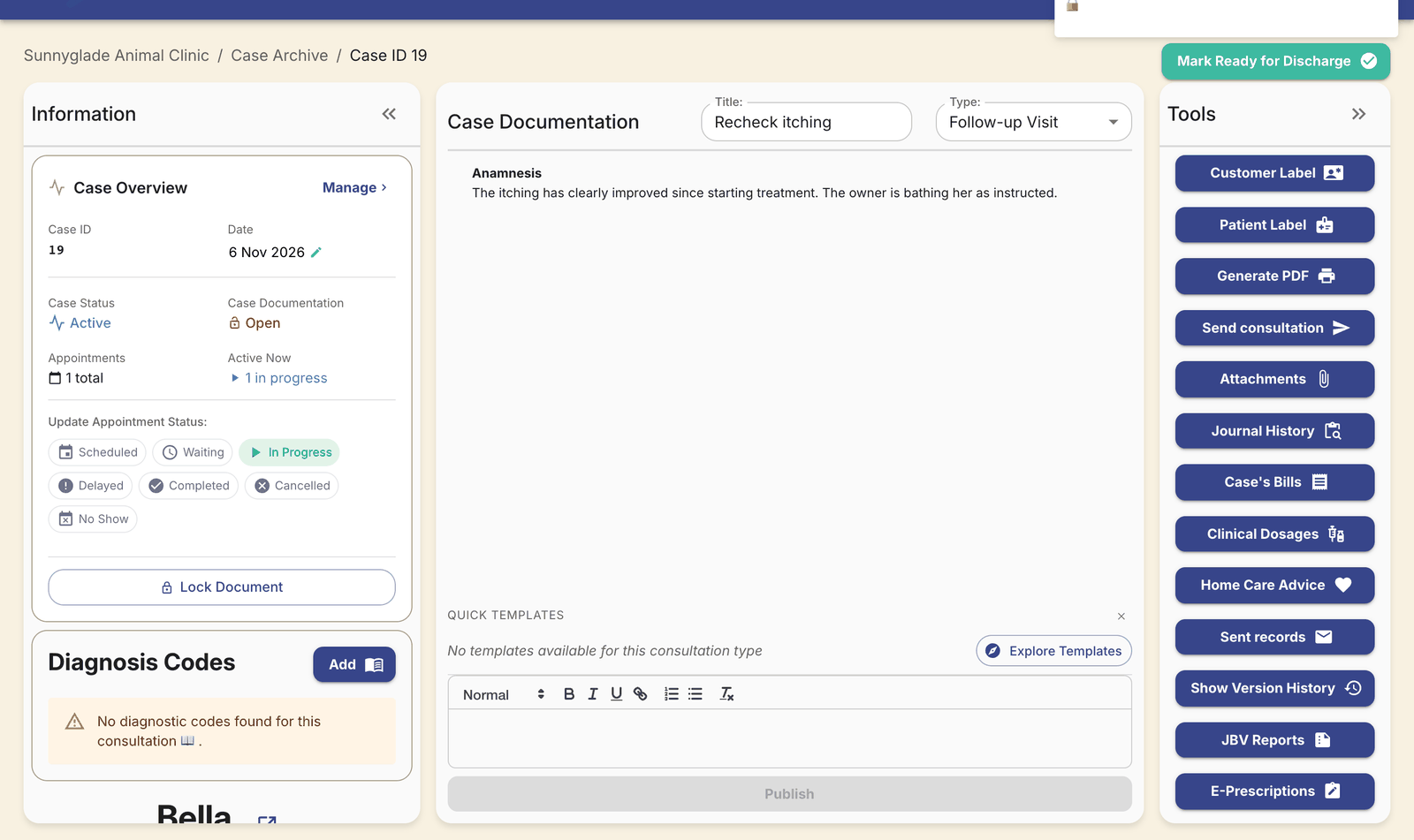
What the consultation looks like
| Part | Content |
|---|---|
| Information (left) | Case Overview with the case date, status and appointments, Diagnosis Codes and the patient's details |
| Case Documentation (centre) | Title and type, the journal text and the writing field with Quick Templates |
| Tools (right) | Labels, PDF, attachments, history, invoices, dosages, home care advice, sent records, version history, JBV reports and e-prescriptions |
Collapse the side panels with the arrows in their headings for more room for the text.
The tools
| Tool | Used for |
|---|---|
| Customer Label / Patient Label | Printing labels. See Label printing |
| Generate PDF / Send consultation | The journal as a PDF, to print or email. See Attachments & PDFs |
| Attachments | Uploading pictures and files |
| Journal History | The patient's earlier consultations, side by side with the one you're writing |
| Case's Bills | Invoices for the case |
| Clinical Dosages | Medicines and consumables given during the visit |
| Home Care Advice | Advice for the owner. See Journal notes & home advice |
| Sent records | Referrals and journal copies. See Referrals and sent records |
| Show Version History | Earlier versions of the journal text |
| JBV Reports | Reports to the Swedish Board of Agriculture (Sweden). See JBV reports |
| E-Prescriptions | Prescribing through VETiSearch (Sweden). See E-prescriptions |
A planned case that hasn't started
A case created from an appointment can be planned before the visit starts. It then says the case hasn't started. Click Start writing, or set the appointment to In Progress, and the documentation opens.
FAQ
Where do I change the case title and type? At the top of Case Documentation, in the Title and Type fields.
Where do I change the case date? In Case Overview, with the pencil next to the date. See Lifecycle & auto-lock.
Can a case have several appointments? Yes. For example surgery and a recheck. They all show in Case Overview.