Book an appointment
Everything that goes into the calendar is booked in the same form: patient visits, clinic events and personal appointments. The form looks the same whether you open it from Reception, Home, the patient card or the journal.
Interactive guide
Start the guide
Try it step by step in a copy of VetJay. Nothing you do there affects your clinic.
Open the booking form
- Click Book Appointment (the calendar icon) in Reception.
- Or click a free time in the calendar. The time and team member are filled in for you.
At the top of the form you choose what you are booking:
| Choice | Used for | Customer and patient |
|---|---|---|
| Patient (default) | A visit with an animal | Required |
| Event | Clinic work with a time: admin time, calling a customer, a team meeting | No |
| Personal | Your own errand: the dentist, picking up the kids | No |
All three take time from their team members. That time can't be booked, internally or through online booking. The kind of a booking can't be changed afterwards. Delete it and book it again instead.
Book a patient visit
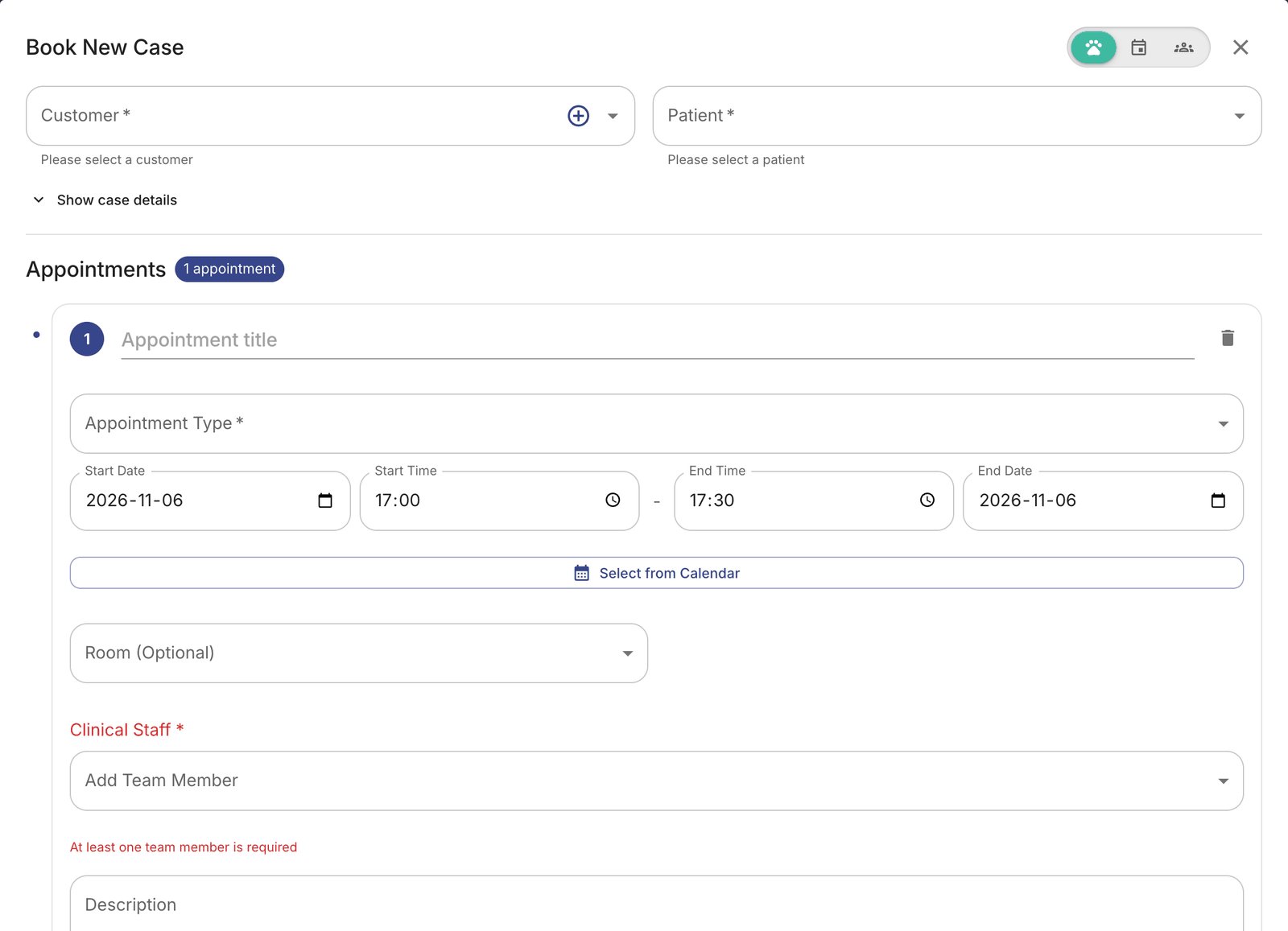
- Choose the Customer. If the customer doesn't exist, click the plus icon to add one right away (in Sweden preferably with SPAR).
- Choose the Patient. You can also start with the patient: search for the animal and the owner is filled in.
- Fill in the visit under Appointments: title, Appointment Type, start and end time, and Clinical Staff. Room (Optional) and a description can be added.
- To see free times, click Select from Calendar.
- Choose whether the customer gets a confirmation by email and/or SMS.
- Click Book Case.
The appointment goes into the calendar and the Reception queue. If the animal needs several visits in the same case, such as surgery and a recheck, click Add Another Appointment before you book. Under Show case details you can set the case title, the responsible person and a reference journal.
What you type is kept while the form is open, even if you switch browser tabs. If you close the form, VetJay asks whether to discard the changes.
Book an event
Use Event for work that takes time but isn't about an animal.
- Choose Event at the top of the form.
- Fill in What, for example Admin time or Team meeting, and the time.
- Choose the Clinical Staff. The person booking is not added automatically.
- To repeat the event, choose Daily (weekdays), Weekly or Monthly instead of Does not repeat, and set Repeat until. A series can be at most 12 months.
- Add Tasks to be done during the event, for example Call customer A about the receipt. For a series, Copy tasks to every occurrence decides whether every occurrence gets its own tasks or only the first.
- Click Book Event.
Events show as dashed cards in the calendar. Anyone in the clinic can change an event and its status.
A task can also be scheduled into an existing event from the task list. See Tasks.
Book a personal appointment
Choose Personal, fill in the time and an optional title, and book. Only the people in a personal appointment can change it. Personal appointments can repeat too.
Change a booking
- Click the booking in the calendar. The details panel opens.
- Click Edit, make the change and save.
For a repeating event, VetJay asks whether the change applies to This event only or This and following events. Removing occurrences from a series also deletes their open tasks.
Move with drag and drop
In the Day and Week views you can drag a booking card to a new time. The time changes only when you confirm.
- Reschedule & notify moves it and sends email and/or SMS to the customer, depending on what you chose.
- Reschedule only moves it without telling the customer.
- Cancel leaves the booking as it was.
SMS is off if the customer has no mobile number or has opted out under Notifications. Completed, cancelled and no-show bookings can't be dragged. Neither can bookings that span several days. Change their times in the form instead.
To move a booking to another vet, open it and change the person under Clinical Staff.
FAQ
What if the customer doesn't exist? Add the customer in the booking form. The details are saved in Customer book.
Can a patient visit repeat? No. Repeated visits are booked as several appointments in the same case. Only events and personal appointments repeat.
How does internal booking differ from online booking? Staff book internally here. Customers book themselves through online booking. Requests that need assessing go to the Triage queue.