Control Room
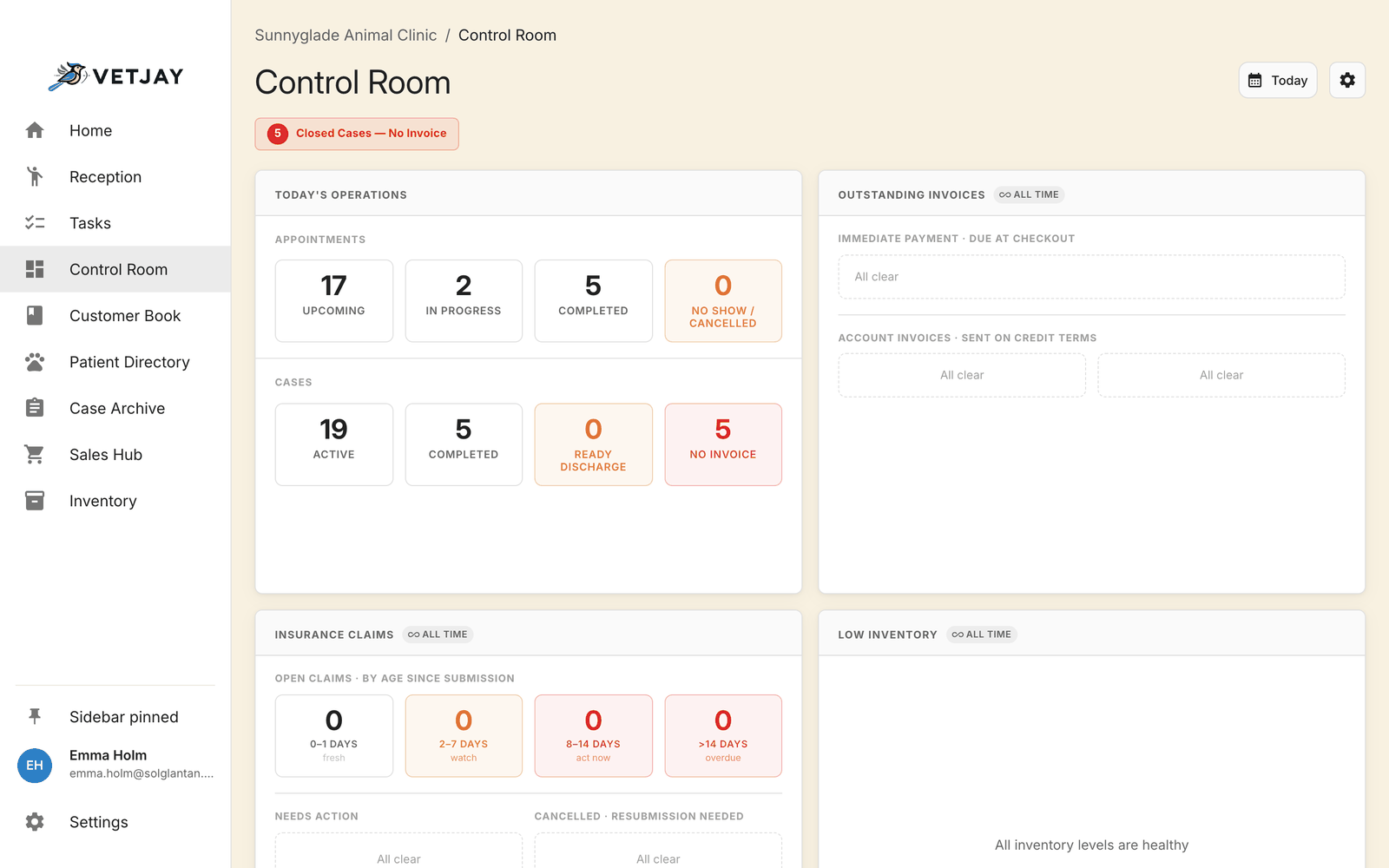
Control Room gives a real-time overview of clinic operations. The page requires a plan that includes Control Room. The Outstanding Invoices card also requires permission to manage payments.
Filters
- Dates: Today, This Week, Last 7 Days, This Month, Last 30 Days
- Select Clinic if the company has several sites
- Customize dashboard to show, hide, and reorder cards
Five cards
| Card | Content |
|---|---|
| Today's Operations | Appointments and Cases |
| Outstanding Invoices | Unpaid and overdue invoices that need follow-up |
| Insurance Claims | Pipeline 0–1 days, 2–7 days, 8–14 days, >14 days; rejected and cancelled; needs attention chip |
| Low Inventory | Empty: All inventory levels are healthy |
| Expired Inventory | Empty: No expired products |
Summary warnings can show Unpaid — Due now and Closed consultations — No invoice. The detail modal has View, Invoice, and Open.
The Insurance Claims card highlights claims waiting for the clinic's reply. The other four cards, except Today's Operations, show All time.
FAQ
Who can see Control Room? Everyone at the clinic, if the plan includes Control Room. Outstanding Invoices also requires permission to manage payments.
How often do the numbers update? The cards follow operations in realtime. Reload the page if you want to be sure you have the latest state.